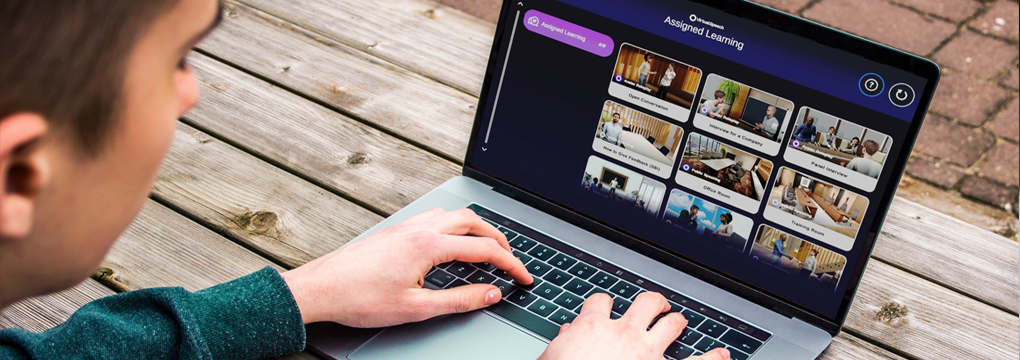

Most workplace training doesn’t change behaviour, and every L&D team knows it. Employees sit through a workshop, retain little, and no one can prove it worked or scale what did. If your training catalogue is full of content people forget, the missing ingredient is usually practice.
This is where simulation-based training helps L&D and HR teams. It gives your people realistic, low-stakes practice at scale, plus a way to measure the result. In this article we’ll covers what simulation-based training is, where it fits, its benefits and challenges, and how to prove its impact.
What Is Simulation-Based Training?
In short, simulation-based training lets employees carry out realistic simulations of the day-to-day events and interactions they meet in their workday. Through these immersive scenarios, they learn how to perform their role in a managed, low-stakes environment – meaning they can practice a situation as many times as they need to get it right.
Through these simulations, employees improve their skills and build real confidence that helps them when they face the same situation in real life. This approach can supplement traditional online training, and it can often outperform it, because learners practice in a way that makes use of experiential learning principles.
The best simulation-based training involves learners attempting a scenario before receiving feedback on what to fix, reflecting on it, and then applying the changes on the next practice attempt. Because that loop repeats safely, with fewer consequences than real-life workplace scenarios, these small corrections over multiple attempts compound into a noticeable shift in how someone handles the real-world situation.
This makes simulation-based training a great fit for any skill that improves with practice, such as customer service, negotiation, leadership, and presenting. If a job depends on a conversation going well, there is a scenario worth rehearsing.
A 2026 study published in the U.S. National Library of Medicine, compared simulation training with traditional teaching and found that simulation training significantly improved learners’ skill scores and lifted confidence.
The takeaway is that when employees rehearse the situations they’ll actually meet at work ahead of time, they feel more capable in their role. They develop those skills faster because the environment is interactive rather than passive.
Part of that gain comes from psychological safety. In a real meeting, a botched pitch or a clumsy piece of feedback has consequences, so people play it safe and learn slowly. In a simulation, a mistake costs nothing, which frees employees to experiment and adjust until they find an approach that works for them.
Examples of Simulation-Based Training
Simulation-based training suits almost any role that involves talking to people. Pick scenarios that match the conversations your people actually have, then let them practice until the skill holds up under pressure. Here are four common examples you can add to your catalogue.
Customer Service Simulation
A customer service simulation lets employees practice handling angry customers over the phone or even face-to-face. These moments are stressful and hard to manage in real life. In a simulation, employees rehearse responses that fit your organization’s culture, so they can defuse the situation while staying calm.
A learner can open with a line such as “I can see why that’s frustrating” before moving to a fix. They then practise acknowledging the complaint, confirming what happened, checking the account, and agreeing a clear next step. If the AI customer escalates, the learner tries a different approach and watches the tone shift.
Virtual Presentation Simulation
For office-based roles, simulations help employees practice delivering presentations, either over video or in-person in front of a live audience, a skill many employees lack. These simulation can replicate video conferencing software such as Zoom or Teams or a dynamic live audience in an auditorium that asks relevant questions during and after the talk.
Because the same talk can be run again and again, a presenter can watch each metric move. They might upload their real slides and cut filler words on the second run. On the third, they slow their pace until the delivery feels controlled.
Sales Pitching Simulation
If a role is mainly sales-focused, employees can learn to give a strong pitch with sales pitching simulations. They run through a demo pitch in a simulated virtual meeting room. Your team can rehearse the pitch and its timing, then practise answering client questions and common objections, with feedback after each attempt.
Objection handling is where reps often freeze. In a simulation, a rep can practice replies to objections like “your price is too high” or a mention of a competitor. They refine the wording and build a calm, ready answer for the live call.
The same scenario also teaches pacing and discovery. A rep can test asking two questions before pitching, then compare it against a run where they launched straight into the product. Seeing the difference on their own recording lands harder than any coaching note.
Difficult Conversations
Everyone faces a difficult conversation at some point, especially those who manage a team or department. Simulations let managers rehearse them, such as giving a poor performance review or delivering redundancy news to a long-known colleague. This practice shows how to handle a tough conversation with sensitivity and authority, so managers can lead these moments well.
A manager can rehearse the opening line, which is where these conversations usually go wrong. They can practice opening with the issue and one specific example, then pausing to listen rather than filling the silence. Doing this a few times before the real meeting takes much of the fear out of it.
Simulations Alongside E-Learning or as a Standalone Tool
Simulations work well as a standalone tool when employees already have the knowledge and simply need to put it into practice. A manager may know in theory how to handle a difficult conversation, yet struggle to say the right thing when the moment arrives. Repeated practice closes that gap.
Simulations can also pair well with e-learning, especially when an employee starts from a beginner level. E-learning teaches the theory and best practice, and simulations then push learners to apply it and get feedback on their performance. Using a simulation as the endpoint of an e-learning module gives learners a chance to put new knowledge into action. That solidifies it in their minds and bridges the gap between theory and practice.
Take a manager onboarding module, for example. Learners study the theory on giving feedback, then enter a roleplay where they deliver it to an AI colleague who pushes back. The reading gives them the model, and the simulation makes them use it under pressure.
This pairing also fixes a common e-learning problem, which is that completion looks like learning but rarely is. A finished module tells you someone clicked through the slides. A completed simulation, scored on performance, tells you whether they can actually do the thing they’re being assessed on.
Benefits of Adding Simulations to Your Training Catalogue
Adding simulations to your organization’s training catalogue benefits both your employees and you as the employer. Employees get plenty of practice in a low-risk, low-pressure setting, where feedback helps them improve the areas that need it most. Over time, that leads to fewer mistakes in real life interactions.
Flexibility
Practice is also self-paced, which matters for a distributed workforce. An employee can rehearse a pitch at 9pm before a morning meeting, while a colleague elsewhere practices the same scenario at lunch. No trainer has to be online for either of them to improve, and both get the same feedback quality wherever they sit.
Consistency
There is also a consistency benefit that matters across a global workforce. When every rep practises the same objection-handling scenario, your teams answer a tricky question the same way in London as in Singapore. That is hard to achieve with one-off in-person workshops run by different trainers.
Employee satisfaction
Development like this also helps you keep people in your organization for longer, reducing onboarding and new hire costs. According to LinkedIn’s 2024 Workplace Learning Report, 90% of organizations are concerned about employee retention, and providing learning opportunities is the number one retention strategy. Simulations can also trim travel and logistics costs, since employees practise from their desk instead of travelling to a session.
Scalability
The benefit that matters most at enterprise scale is coaching. Live roleplay with a human facilitator works well, but it cannot scale to thousands of employees. AI-driven simulations give every learner the same feedback on demand, so a small L&D team can support a global workforce without adding headcount.
Challenges to Weigh Before You Roll Out
Simulation-based training is not free of trade-offs, and an honest rollout plan accounts for them. A 2023 study from Multimodal Technologies and Interaction documents several recurring challenges for workplace simulation:
- High upfront cost: building custom scenarios from scratch takes real time and budget.
- Technology obsolescence: specialized hardware and software can date quickly.
- Design and expertise burden: effective simulations need instructional design skill to build.
There is a fourth challenge the research understates, which is learner adoption. A tool only helps if people actually use it. Busy employees skip training that feels like a chore or takes too many clicks to reach.
VirtualSpeech lowers each of these barriers. Our no-code Roleplay Studio lets your team build bespoke scenarios in minutes, which cuts the upfront cost of authoring. The platform runs in a browser with no headset or download required, so it’s accessible, easy-to-use, and always up-to-date on the learner’s side.
More than 50 off-the-shelf exercises mean you can launch today without designing anything from scratch. That lets an L&D team pilot simulation-based training in weeks rather than quarters, then expand the scenarios that prove their worth.
Measuring the Impact of Simulation Training
L&D teams live under pressure to prove that training works. A workshop that leaves no data behind is hard to defend, and “the room felt engaged” will not win next year’s budget. Simulation training solves this, because every practice attempt produces evidence.
Each roleplay generates performance feedback and a score, so you can see where a learner started and how far they have come. You can also track completion and watch confidence build across repeated attempts.
Confidence is worth measuring in its own right, because it often predicts whether a skill transfers to the real world. A learner who scores well but still hesitates will benefit from more reps, and the data makes that visible. Tracking attempts alongside scores shows who passed and, more usefully, who is genuinely ready.
Where VirtualSpeech fits in
VirtualSpeech’s Admin Dashboard turns that activity into individual- and team-level analytics, so you can report progress to leadership with real numbers. It also integrates with your existing LMS and API, which keeps simulation data in the systems your team already uses. That gives you a clear line from practice to measurable skill improvement, which is what an enterprise buyer needs to renew and expand a programme.
For a business case, the useful comparison is a before-and-after score on the same scenario. Baseline every learner on their first attempt, set a target score, and track the cohort as they practise toward it.
When you can show a leadership team that average pitch scores rose across a sales org, the conversation about training budget changes. You move from asking leaders to trust that training helped, to showing them the numbers that prove it.
Conclusion
Adding simulation-based training to your catalogue helps employees rehearse the parts of their role that matter most. Their skill and confidence then carry into everyday virtual communication and interactions. You also gain the data to show a leadership team that the training moved a number, which is what keeps a programme funded.
For teams in remote or online-heavy settings, it is a practical way to build a confident, well-prepared workforce. They will be ready for the conversations their roles demand.
You do not need to overhaul your catalogue to start. Pick one high-stakes conversation your people struggle with, then add a simulation and measure the before-and-after scores. Once that first scenario proves its value on the numbers, the case for the next one makes itself.
Want to learn more? Speak to our team about how VirtualSpeech can fit into your L&D team’s training catalogue.