
“Immersive learning helps people practice skills in realistic scenarios—safely, repeatedly, and at scale.” – Meta
Virtual and mixed reality training has moved from “nice experiment” to a practical way to upskill teams faster, more consistently, and with less risk than many traditional methods. Meta Quest headsets (Quest 3 and Quest 2) are popular in workplace learning because they’re standalone, easy to deploy, and support a wide range of training content, especially for soft skills, customer scenarios, and high-stakes practice.
This article takes an outcomes-first look at why organizations use Quest for training, what it’s best for, how to roll it out successfully, and which headset features actually matter.
Why VR training works (and where it beats traditional methods)
1) Practice ‘real’ situations without real-world consequences
VR lets employees rehearse challenging scenarios repeatedly – without safety risks, customer impact, or travel/logistics overhead. It’s particularly effective when the real-world version is expensive, risky, hard to schedule, or emotionally demanding.
Common workplace training scenarios include:
- Fire safety, evacuation, and emergency response simulations
- Customer service, complaint handling, and de-escalation practice
- Sales pitches, discovery calls, negotiation, and objection handling
- Leadership conversations: feedback, coaching, performance reviews, conflict resolution
- Presentation practice and public speaking in realistic environments
2) Higher engagement and stronger behavior change for soft skills
One reason VR performs well for communication and leadership training is that it creates presence – people feel “in the situation,” which is hard to replicate via slide decks or standard e-learning. That emotional and situational realism encourages learners to take practice seriously and helps make training more memorable.
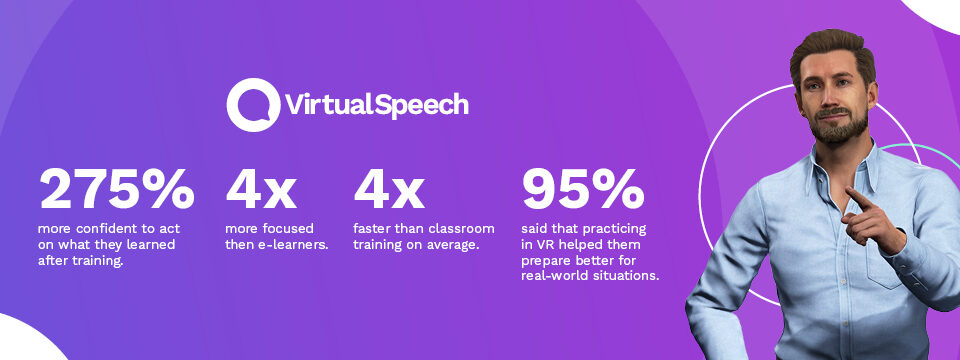
In corporate research, VR learners have been reported to complete training faster, stay more focused, and feel more confident applying what they learned afterward—especially for soft skills, where practice matters more than passive knowledge.
3) Better standardization and measurable skills signals
Compared with purely instructor-led sessions (which vary by facilitator and cohort), VR scenarios can be delivered consistently across locations and teams. Training platforms can also capture structured signals—such as completion, decision points, response timing, and self-reflection—to support coaching and continuous improvement.
- Read more on the benefits of VR training
VirtualSpeech soft skills training in VR.
What Meta Quest adds specifically (beyond VR in general)
Meta Quest’s biggest advantage in corporate training is reduced friction: it’s easier to deploy, easier to share, and easier to run consistent sessions without specialist hardware.
Standalone, portable, minimal setup
Because Quest headsets are all-in-one, you can run many training experiences without a tethered PC. That makes them practical for rolling out across multiple sites, rotating between learners, or using in pop-up training sessions.
Mixed reality (especially relevant on Quest 3)
Quest 3 supports mixed reality experiences that blend the physical space with digital content. For training, this can be useful when you want the learner to stay oriented in a real room, while still seeing guided overlays, objects, or simulations.
Mixed reality is especially promising for workflows that benefit from real-world context—like coaching, onboarding in a real environment, or learning procedures where physical space matters.
Comfort and clarity impact session time-on-task
For training programs, ‘specs’ matter mainly when they affect comfort (can learners stay in long enough to practice properly?) and clarity (can they read text and UI without fatigue?). Better optics and comfort can translate into longer, more productive sessions.


Quest 3 vs Quest 2 for training: what to choose
Both headsets can deliver effective training. The right choice depends on your use case, your rollout size, and how long you want the hardware to stay current.
Choose Quest 3 if you prioritize mixed reality and longevity
- Mixed reality use cases (blending physical and digital)
- Comfort and clarity for longer, repeated training sessions
- Investing in the newest device ecosystem for the next few years
Choose Quest 2 if you prioritize cost-effective pilots or larger rollouts
- Lower cost for pilots and scaled deployments
- Primarily VR (not MR) learning experiences
- Standard training modules where mixed reality isn’t required
Tip: Many organizations start with a pilot (for example, 5-25 headsets), prove the learning outcomes, then scale with a mix of devices based on role and scenario.

Implementation playbook: how to roll out VR training successfully
1) Start with a measurable outcome (not a headset)
VR training works best when it’s tied to a clear business or performance goal. Choose one or two outcomes to validate early, such as:
- Reduce time-to-competency for new hires
- Improve customer satisfaction outcomes in a specific interaction
- Increase presentation confidence and performance
- Reduce safety incidents or near-misses (where relevant)
2) Design scenarios that reflect real work
VR isn’t a magic trick – it’s a practice environment. The more closely your scenarios match day-to-day reality, the better the transfer back to work:
- Use your real policies, scripts, and escalation paths
- Include common objections, stressors, and ‘curveball’ moments
- Allow repetition with variability (same skill, different context)
3) Plan the operational basics (so the pilot doesn’t stall)
Even small pilots benefit from simple operational planning:
- Charging, storage, and rotation workflow
- Hygiene process between learners
- Onboarding guide: fit, comfort, re-centering, and safe play area
- Facilitator checklist for group sessions (and casting, where useful)
4) Measure, learn, and improve
Track learning metrics (completion, attempt count, decision quality), confidence shifts (pre/post quick surveys), and business KPIs (onboarding time, QA scores, customer outcomes, incident rates). Use the results to refine scenarios and coaching.
Accessories and parts that matter for training
Accessories are most valuable when they improve comfort, hygiene, and uptime:
- Carry case for transporting and storing headsets safely
- Alternative facial interfaces for better fit and easy cleaning
- Extra battery options for longer training days, demos, or events
Case studies and outcomes
Different organizations report different results depending on the training scenario, rollout, and measurement approach. However, commonly reported benefits include reduced time in classroom sessions, improved performance in simulations, and lower costs from reduced travel and downtime.
- Johnson & Johnson reported significant performance improvements when using VR training in partnership with Osso VR.
- Nestlé Purina reported savings related to travel and lost productivity when shifting parts of training into VR.
- Hilton reported large reductions in in-class training time for some modules when VR was introduced.
- Vodafone reported very high learner satisfaction and interest in expanding VR training.
Explore more VR training case studies
Pricing and where to buy
Prices change frequently by region and promotions, so it’s best to reference official listings or retail partners rather than hard-coding exact figures in an article.
Where to buy
In summary
Meta Quest headsets provide a practical, user-friendly way to deliver immersive training at scale. VR is especially effective when learners need repeated practice in realistic scenarios – without the cost, risk, or inconsistency of purely traditional approaches.
If you’re exploring VR for your organization, start small with one or two high-impact scenarios, measure outcomes, then scale once you’ve proven the value.