
Public Speaking
Rehearse the presentation out loud, before the room is real.
Your people upload their own slides and present to an audience that reacts. Then they answer AI questions drawn from what they actually said. Every talk is scored on content and delivery, with no headset needed.
15+ rooms
from a small office to a conference stage
115k+
speeches completed

Reading the slides at your laptop isn't practice
The presentations that count are the ones nobody gets a second attempt at - the pitch, the board update, the all-hands, the conference talk. In a university it's the seminar talk, the group presentation, the dissertation defence, and the assessed piece a grade hangs on.
What most people do beforehand is read through the deck silently, once. What they need is to say the words out loud, in the room, with people looking at them - and that's the one thing no amount of slide review provides.
Practising alone tells you nothing
Running through it in your head skips the part that actually goes wrong: pace, filler words, and losing the thread when someone looks bored.
Colleagues won't tell you the truth
A run-through in front of the team gets "that was great" and one comment about a typo on slide nine. A tutor with forty students can't give more.
The Q&A is what people fear, and nobody rehearses it
Most preparation covers the talk and stops at the moment the first hand goes up.
What a session looks like
Anything from a thirty-second pitch to a full-length talk, in a browser or in a headset.
01
They bring their real material
Upload the actual slides or notes. They practice with the thing they'll present.
02
They pick the room
Different venues, from a boardroom of six to a conference stage. Choose the audience size and how attentive they are.
03
They deliver it out loud
A minimum of thirty seconds, or as long as the real thing. The audience reacts - shifting, looking up, checking phones.
04
They take questions
The AI asks questions based on what they actually said, not a generic list. Then the score arrives, and they can talk it through with a coach.

Illia Gugenishvili
Abo Akademi, Assistant Professor / Lecturer in Marketing
"VirtualSpeech training has become one of the most memorable parts of our courses. Students really valued having the chance to test their presentations, notice where they could improve, and build genuine confidence in their delivery. Many said it made a real difference in how they approached their final presentations."
The questions come from what they actually said
This is the part that separates a rehearsal from a practice session. When the talk ends, the AI asks questions drawn from the content of that specific delivery - including the claim they made loosely, or the number they skipped past.
It's also the part people are most afraid of, and the part conventional training never reaches. A workshop can cover structure and delivery. It can't put a hand up at the end and ask why the figures don't add up.
Learners can also add their own questions in advance, so a team can rehearse against the objections they know are coming.
After a product roadmap presentation
"You said the migration would be complete by Q3 — what happens to the customers still on the old platform after that?"
"You mentioned cost savings twice but didn't give a figure. What are we actually expecting to save?"
"How does this change what you're asking my team to deliver next quarter?"
Scored on the talk and the delivery
Five criteria chosen for what that particular session is testing, each with a written explanation of what the person said and what to change. A conference talk isn't judged on the things that matter in a one-to-one pitch.
Alongside them are delivery metrics people can’t self-assess: speaking pace, filler words, listenability, eye contact, and body language when practicing in a headset.
Across five practice sessions, presenters' scores rise 12% on average, with body language up 20% and eye contact up 14% in VR. (Based on nearly 400 learners who completed five or more presentation sessions)
How AI Feedback works - More on AI Coaching
Most of the independent research on our platform looks at exactly this - presentation confidence, speaking anxiety and delivery measures in real university courses.
A competency-based presentation
Overall: 7.9
Speaking pace: 162 wpm
Hesitations: 3
Eye contact: 74%
Notes Used

Sean Kelly
University of Auckland - Technology and Prototyping Manager
"VirtualSpeech helped FINANCE 251 students practise presentation skills in a safe, non-judgemental environment while receiving immediate, consistent feedback on their performance. For large courses, it offers a practical and scalable way to support communication skills development when supported by appropriate VR infrastructure."
Public Speaking Rooms
Presenting to six people around a table is a different skill from holding a lecture hall. Learners choose the venue, the audience size and how difficult they want it.

Conference Room
A large space for rehearsing talks and presentations. Perfect for practicing clarity, confidence, and timing.

Auditorium
A large, formal venue. Ideal for practicing projection, stage presence under challenging lighting conditions.

TEDx Styled Theatre
A modern stage with a spotlight feel. Perfect for storytelling and inspirational talks.
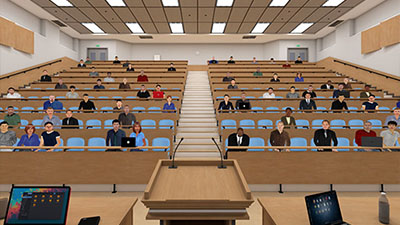
Lecture Hall
An academic environment with a choice of audience size. Great for practicing pacing, explanation, and authority.

Event Hall
A versatile, less formal space. Guest speeches and events.

Meeting Room
A professional, small-group space with your choice of audience size. Great for everyday workplace communication.

Boardroom
A high-stakes, executive setting with your choice of audience size. Practice persuasion and leadership communication.

Office Room
A professional office set up for one-to-one or small group conversations.

Training Delivery
A professional learning environment. Great for practicing training, questions, and interactive teaching.

Classroom
A single classroom setup. Perfect for practicing lesson delivery, clarity, and teacher presence.

Computer Room
A modern educational space. Ideal for practicing instruction.

Press Conference
Present your press statement or other material at a small press conference.

Media Ambush
Experience being ambushed by the media in a hotel lobby and practice answering questions.
In the browser, or in a headset
Every venue runs on a laptop or tablet with nothing to install, which is how most programmes roll out. In a headset, the same session adds presence, body language scoring, and the feeling of actually standing there - which is why presenting is the practice type customers most often move into VR.

Frequently Asked Questions
See it with a presentation your people actually give
Tell us what your people present, whether that's pitches, board updates or conference talks, and we'll show you a live session on the call. You'll see how the audience reacts, the questions the AI asks, the feedback a presenter gets, and the data you'd see as an admin.
What happens on the call
Discuss your training goals
Customize learning live on the call
Rollout options and pricing
We reply within one working day.